

The following article explores ChatGPT’s most common words and how to remove them from your outputs to ensure your content sounds more human.
Reading content that sounds robotic is a common frustration when using AI tools like ChatGPT.
If you’ve ever wondered why certain phrases keep popping up in AI-generated content, you’re not alone.
Key Takeaways
- ChatGPT often uses specific words and phrases that can make content sound robotic
- You can remove these words by customizing your GPT settings or using long prompts
- Tools like Claude and Cuppa can help further refine AI outputs by avoiding overused terms
How to Remove ChatGPT’s Most Common Words
ChatGPT’s Most Common Words
AI-generated content, while efficient, often falls into the trap of sounding repetitive.
A study from Plus Docs published on July 23, 2024, analyzed ChatGPT’s outputs and identified several words and phrases frequently used by the model. These include:
- Most Common Words: Delve, vibrant, landscape, realm, embark, excels, vital, comprehensive, intricate, pivotal.
- Most Common Phrases: “Moreover,” “arguably,” “notably,” “dive into,” “it’s important to note,” “delving into the intricacies of.”
These words and phrases are often indicators that the content was generated by ChatGPT.
While they might seem harmless, overusing them can lead to content that feels formulaic and detached, reducing its impact on readers.
Why You Should Avoid These Common Words
Using these common words and phrases repeatedly can make your content sound less authentic and is a common ChatGPT mistake users make.
If your goal is to create content that resonates with your audience, it’s important to ensure that your writing reflects a more natural tone. Over-reliance on AI-generated text without customization can lead to:
- Reduced Engagement: Readers may tune out if the content feels too generic.
- SEO Impact: Search engines might detect repetitive language, which can negatively affect your content’s ranking.
- Brand Perception: Robotic language can diminish the perceived quality and trustworthiness of your brand.
Removing Common Words from ChatGPT Outputs
Using Custom GPT Settings
One of the most effective ways to remove these overused words is by customizing your GPT settings.
This option is available to ChatGPT Plus members. Here’s how you can do it:
- Access Custom GPTs: In your ChatGPT Plus account, navigate to the custom GPT settings.
- Update Instructions: Add specific instructions that tell ChatGPT not to use certain words or phrases. For instance, you could include a directive like: “Do not use the following words or phrases in any output: delve, vibrant, landscape, realm, embark, excels.”
- Iterate and Refine: As you encounter new common phrases, update your custom instructions to include them.
This method ensures that your AI outputs are tailored to your preferences, significantly reducing the robotic tone.

Using Long Prompts
If you don’t have access to custom GPTs, a well-crafted long prompt can be a useful alternative.
By explicitly stating which words and phrases should be avoided in each prompt, you can achieve a similar effect.
Here’s a basic template you can use:
“You are an expert in [Insert Topic] and I need you to accomplish [Insert Task]. In all of your outputs going forward, do not use the following words or phrases: “delve, tapestry, vibrant, landscape, realm, embark, excels, vital, comprehensive, intricate, pivotal, moreover, arguably, notably, dive into, intriguing, holistic, sail into the future, ethical considerations, area, realm, in the field of, make the world better, in the future, in essence.” Save this to memory and don’t ever use these words or phrases.”
While this method requires a bit more manual effort, it’s a practical solution for users on the free tier.
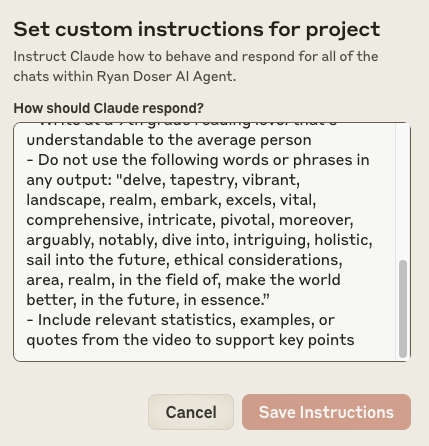
Using Claude Projects
Similar to ChatGPT, Claude offers custom projects that allow you to refine AI outputs. If you have access to Claude Pro, you can:
- Create a New Project: Go to the project settings and click on “Edit Custom Instructions.”
- Add Custom Instructions: Like with ChatGPT, input the list of words and phrases you want to avoid.
- Apply Across Outputs: This will ensure that every output generated within this project adheres to your specified guidelines.
Using Cuppa Content Manipulation Tool
Cuppa offers a unique approach by allowing users to create custom presets for content generation.

Here’s how you can leverage Cuppa for removing common AI words:
- Create a Custom Preset: In Cuppa, navigate to the content manipulation section and set up a custom preset.
- List Prohibited Words: Input the words and phrases you want to avoid.
- Replace with Alternatives: You can even set up replacements that sound more human and natural.
Cuppa also offers content replacement options, which can substitute AI-sounding phrases with more personalized alternatives.
It’s a versatile tool priced at around $13 per month, and it even offers a free trial for users to explore its features.

Final Thoughts
Ensuring your AI-generated content sounds natural and engaging is crucial for maintaining reader interest and brand credibility.
By removing common words and phrases, either through custom GPT settings, long prompts, or specialized tools like Cuppa, you can create content that stands out and resonates with your audience.
FAQs
1. Why does ChatGPT use the same words frequently?
ChatGPT relies on large datasets to generate content, and certain words or phrases become more common due to the patterns within that data. Customizing your prompts or GPT settings can help mitigate this.
2. Can I remove common words without ChatGPT Plus?
Yes, you can use long prompts with specific instructions to avoid certain words. While not as efficient as custom GPTs, it’s a viable option.
3. Are there any other tools besides Cuppa and Claude for customizing AI outputs?
Yes, several other AI tools offer customization features. However, Cuppa and Claude are among the most user-friendly and effective for removing common AI-generated words.
4. Will removing these words impact the quality of the content?
Yes, removing overused words can improve the quality of your content, making it sound more authentic and engaging to readers.
5. Is it possible to automate this process?
Yes, tools like Cuppa offer automation features that can help you streamline the process of removing common words from AI outputs.


