

This article shows how to clone yourself in ChatGPT to revolutionize your workflow and content creation process.
In today’s fast-paced digital world, staying productive while maintaining a consistent online presence can be challenging.
But what if you could clone yourself using artificial intelligence? Let’s dive into one of my favorite ChatGPT hacks.
Key Takeaways
- Creating a ChatGPT clone of yourself can significantly boost your productivity and content output.
- The process involves using custom GPTs (available for ChatGPT Plus or Enterprise users) and providing personal data.
- Ethical considerations and maintaining authenticity are crucial when implementing an AI version of yourself.
How to Clone Yourself in ChatGPT (Video)
Why Create a ChatGPT Version of Yourself?
As a business owner or content creator, you might find yourself struggling to consistently create content across various platforms.

By creating an AI version of yourself using ChatGPT, you can:
- Increase content output: Generate more content for social media, blogs, and other platforms.
- Maintain your personal touch: Ensure the content sounds like you, reflecting your unique style and expertise.
- Save time: Delegate consistent content creation tasks to your AI clone, freeing up time for more strategic work.
How to Build Your ChatGPT Clone
Creating a digital version of yourself using ChatGPT involves several steps. Here’s a simplified guide to get you started:
Step 1: Access Custom GPTs
To create a ChatGPT version of yourself, you’ll need access to custom GPTs. These are currently available only to ChatGPT Plus or Enterprise users.
If you’re on the free plan, you might need to consider upgrading to access this feature.

Step 2: Configure Your Custom GPT
- Click on “Create” to start building your custom GPT.
- Upload a profile picture to personalize your AI clone.
- Name your GPT (e.g., “Your Name AI Agent”).
- Provide a description of your AI agent’s purpose and capabilities.

Step 3: Set Instructions and Knowledge Base
- Write detailed instructions for your AI clone, including your areas of expertise and preferred writing style.
- Specify words or phrases to avoid, ensuring your AI clone doesn’t sound robotic.
- Upload relevant documents to build your AI’s knowledge base, such as:
- Your LinkedIn profile (saved as a PDF)
- A professional bio
- Transcripts from podcasts or interviews you’ve done

Step 4: Fine-tune with Additional Data
To make your AI clone sound more like you:
- Copy and paste transcripts from podcasts or interviews you’ve been featured in.
- Include examples of your writing, such as blog posts or social media content.
- Add any other relevant personal content that showcases your style and expertise.
Step 5: Test and Refine
After creating your ChatGPT clone:
- Test it by asking it to create content in your style.
- Refine the outputs by providing feedback and adjusting the instructions as needed.
- Continuously update your AI clone with new content to improve its performance over time.
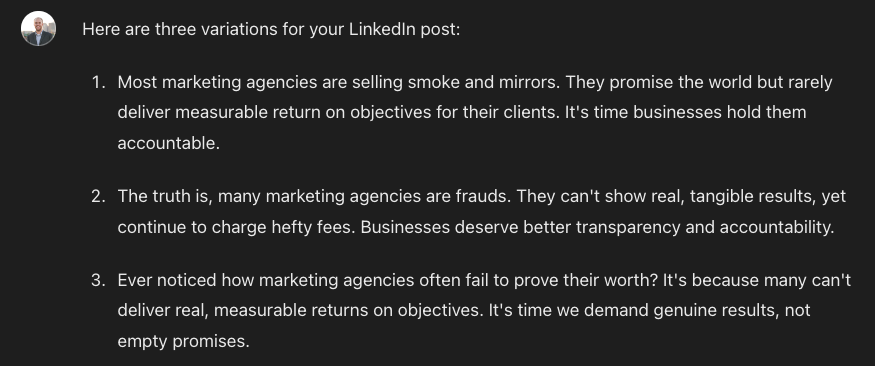
Practical Applications of Your ChatGPT Clone
Once you’ve created your AI version, you can use it for various tasks:
- Generating social media posts
- Drafting blog articles or newsletters
- Responding to common customer inquiries
- Brainstorming content ideas through ideation
- Preparing responses for media inquiries
Ethical Considerations and Best Practices
While creating an AI version of yourself can be incredibly useful, it’s essential to consider the ethical implications:
- Transparency: Always disclose when content is AI-generated.
- Quality control: Review and edit AI-generated content before publishing.
- Personal touch: Use your AI clone as a tool to enhance, not replace, your personal interactions.
- Data privacy: Be cautious about the personal information you feed into your AI clone.
I suggest reviewing OpenAI’s safety standards for more information on AI ethics.
Wrapping Up
Creating a ChatGPT version of yourself can be a game-changer for your productivity and content creation efforts.
By following the steps outlined in this guide, you can build an AI clone that captures your unique voice and expertise.
Remember to use this tool responsibly and always maintain the human touch in your interactions.
As AI technology continues to evolve, the possibilities for personal AI clones will only expand.
Cloning Yourself on ChatGPT FAQs
Is creating a ChatGPT clone of myself legal?
Yes, it’s legal to create an AI version of yourself using ChatGPT. However, ensure you have the rights to all the content you use to train your AI clone.
Can I use my ChatGPT clone for all my online interactions?
While your AI clone can handle many tasks, it’s best to use it as a supplement to your personal interactions, not a complete replacement. Always review and approve AI-generated content before publishing.
How often should I update my ChatGPT clone?
It’s a good practice to update your AI clone regularly with new content, such as recent articles, interviews, or social media posts, to keep it current with your latest thoughts and expertise.
Will people be able to tell the difference between me and my AI clone?
While your AI clone can mimic your style closely, it’s not perfect. It’s important to be transparent about when you’re using AI-generated content to maintain trust with your audience.


